April 22, 2026

# The Solo Exodus: A One-Man Migration from VMWare to Hyper-V 2025

The Solo Exodus: A One-Man Migration from VMWare to Hyper-V 2025

Date: April 22, 2026
Author: “Me” and AI Generation by Gemini
Context: Enterprise Infrastructure Reprovisioning (Small University Environment, 2024–2026)


1. The Timeline: A Journey of Persistence

The “Solo Exodus” was not a rapid sprint, but a multi-year marathon of research, failure, and ultimate success.

  • Late 2024: Initial pre-testing and evaluation of hypervisor alternatives in isolated labs.
  • July 2025: Formal project commencement; deep-dive production testing of Hyper-V and Proxmox.
  • Late 2025: The “Horror Phase”; months of troubleshooting blade chassis networking and SAN connectivity.
  • February 2026: The “February Blitz”; migration of the University’s core ERP and database systems, following the successful transition of numerous production-level auxiliary and infrastructure services over the prior months.
  • April 2026: Final cleanup, legacy environment decommissioning, and transition to full modernized operations.

2. The Catalyst: The Broadcom “Shockwave”

In early 2025, the university’s virtualization strategy hit a wall. With the restructuring of legacy hypervisor licensing, what had once been a routine, predictable renewal process became an existential threat. Broadcom’s aggressive shift in licensing models was perceived locally as a blatant extortion tactic, designed to outprice all but the Fortune 500.

For a solo administrator at a small university, the implications were immediate and dire. A renewal that once fit within a standard operational budget had ballooned into a figure that threatened the department’s ability to maintain even basic services. The mandate was clear and non-negotiable: Total evacuation of the legacy environment by April 30th. This was more than a technical migration; it was a high-stakes race against a licensing expiration date that carried catastrophic financial penalties.

2. The Crucible of Choice: Evaluating the Alternatives

The migration wasn’t a blind jump; it was a calculated escape. The administrator conducted deep-dive evaluations of several “post-VMware” homes, re-testing both Hyper-V and Proxmox on production hardware after initial successes in isolated DR testing.

The Nutanix Wall

While Nutanix offered a powerful hyperconverged alternative, it presented a fatal flaw: its requirement for local storage. Adopting Nutanix would have meant abandoning the university’s significant existing investment in iSCSI SAN hardware. Combined with a “half-million dollar” price tag, Nutanix was fundamentally incompatible with the university’s fiscal and physical reality.

The OpenShift Experiment

Testing Red Hat OpenShift revealed a platform described as “over-complex and convoluted” for a solo shop. The administrative overhead of managing a container orchestration layer just to run traditional VMs was deemed excessive for a one-man team. Furthermore, concerns regarding storage driver compatibility for live migrations—a critical requirement for maintaining university uptime—effectively ended this path as a viable production hypervisor home.

The Proxmox Nightmare

Proxmox initially showed great promise in a DR site, but re-testing on the DR hardware turned into a cautionary tale. A simple SSD upgrade led to a broken cluster, revealing that the platform’s manual resource management and “touchy” configuration made it “potentially unrecoverable” in a solo-admin emergency. The risk of being the only person in the organization capable of fixing a platform that could fail so catastrophically during a routine hardware change was deemed an unacceptable risk to the university’s continuity.

The Winner: Windows Server 2025 CORE

The transition established a fully integrated, high-availability software stack that modernized the university’s virtual ecosystem:

  • Host & Compute: A minimal Windows Server 2025 Core footprint running the Hyper-V role.
  • Orchestration: Failover Clustering for seamless workload mobility and high availability.
  • Networking: A converged fabric using Switch Embedded Teaming (SET) with logically segregated VLANs for Management, Heartbeat, and Live Migration.
  • Storage Architecture: Resilient multi-path iSCSI (MPIO) delivering performance to the Dell SANs through Cluster Shared Volumes (CSV).

3. The Migration Engine: Veeam B&R v12

Veeam Backup & Replication v12 was the definitive saving grace of the entire migration. Its robust V2V (Virtual-to-Virtual) capabilities and instant recovery features provided the safety net required for a solo operation of this scale.

The migration was not a simple 1:1 move; it was a total environment lifecycle event. While 126 VMs comprise the final migrated fleet, the process involved the decommissioning of some obsolete legacy systems and the reprovisioning of some infrastructure and template VMs to meet the new standards of the Hyper-V 2025 environment. Without Veeam’s reliability and its ability to handle the “heavy lifting” of data conversion and repository management, the administrator faced a grim reality: outsourcing the project, forced retirement, or seeking new employment. Veeam didn’t just move data; it preserved the administrator’s sanity and the project’s viability.

4. The Engineering Engine: AI-Human Peer Collaboration

Behind the migration was a massive, high-intensity collaboration between the Human administrator and an A.I. peer. This partnership produced an entire Git project of scripts that transformed manual infrastructure into code.

This wasn’t just a collection of helper scripts; it was an entire ecosystem designed to turn a blank Server Core install into a cluster-ready node. While the legacy environment could often be provisioned in an hour or two, the Hyper-V 2025 “Solo Exodus” was a more deliberate, full-day process. From the initial Windows installation to the final cluster-join and configuration, every step was automated yet intensive, potentially requiring a full workday per node to ensure a production-ready state. The collaboration involved:

  • Iterative Design: Prompting and refining scripts through hundreds of cycles to handle the nuances of Windows Server 2025.
  • A 7-Phase Workflow: Developing a sequential process covering everything from bare-metal NIC renaming and Switch Embedded Teaming (SET) to complex iSCSI fabric orchestration and MPIO configuration.
  • Operational Autonomy: Creating 100+ VM operational workflows that allowed a single person to manage a massive fleet with the same efficiency as a much larger team.

5. The Scale of the Exodus: Environment Sizing

This project was a massive infrastructure reprovisioning across two geographically separated sites, involving both a comprehensive infrastructure refresh and a total hypervisor shift. While the server hardware had been updated in a previous 2023 cycle, the “Solo Exodus” was an entirely data-oriented and software-oriented overhaul of the university’s virtual ecosystem.

Compute Infrastructure

  • Production Cluster (On-Site): 5 x Dell PowerEdge R650 nodes with 512 GB RAM each, running Windows Server 2025 Core.
  • Disaster Recovery (DR) Cluster (Off-Site): 4 x Dell PowerEdge FC630 blade nodes with 384 GB RAM each.
  • Storage Shift: The only physical hardware change required was the installation of SSD OS disks for the DR hosts to replace the legacy SD cards used for VMware booting.
  • Capacity: Over 4 Terabytes of aggregate physical RAM across the clusters, providing the headroom for the final 126 production, testing, and template VMs.

Storage Infrastructure (iSCSI SAN)

  • Production (Dell PowerVault ME5084): 61.4 TB SSD / 526 TB 7K Spindles.
  • DR (Dell Compellent SC4020 + Expansions): 41 TB SSD / 196 TB 7K Spindles.
  • The ReFS “Size Tax” & Tiering: Standardizing on ReFS (Resilient File System) required a mandated 10-15% “size tax” buffer to ensure volume stability. This forced a strategic tiering model where mission-critical databases remained on SSD, while auxiliary systems were provisioned to 7K disks to manage the massive storage footprint.

6. The Technical Battleground: Storage & Networking

The migration’s “horror phase” centered on aging blade chassis hardware and the intricacies of the Windows iSCSI initiator. While Linux could ping iSCSI targets in minutes, Windows 2025 Core proved a stubborn adversary.

The 0.0.0.0 Binding Fix

The ultimate critical necessity for iSCSI/MPIO was the discovery that Windows defaults were binding iSCSI NICs to 0.0.0.0, essentially attempting to route storage traffic over the management network and breaking multipathing. Success was only achieved after hard-blocking these defaults through PowerShell and explicitly binding every session to the correct iSCSI NIC IPs.

The “Miracle” Firmware

DR hardware success was blocked for months by a refused release of firmware for the DR SAN hardware. The vendor claimed no updates were available that would resolve the VLAN tagging issues encountered on the blade chassis. The breakthrough occurred when the administrator discovered, by chance, that a firmware update had been released in the background without advertisement. Immediate installation solved the long-standing VLAN tagging issues, breathing new life into the DR site.

The VLAN Tangle

Tracing tagged ARP packets through the chassis IOMs using pktmon was a week-long battle against failing traffic, ultimately resolved by the “miracle” firmware discovery.

7. Modernized Resilience: Backup & Recovery

The migration necessitated a complete redesign and “surgical” reprovisioning of the entire backup infrastructure to support the new Hyper-V environment.

The Repository Reprovisioning Marathon

Rebuilding the Veeam backup infrastructure on the DR SAN was a high-stakes challenge due to the SAN’s near-total capacity saturation. The administrator couldn’t simply “wipe and start over.” Instead, the process involved days of meticulous data-moves paired with volume-level data UNMAPPING (TRIM/UNMAP) in small multi-terabyte chunks. This was a “surgical” operation to slowly reclaim space and reprovision the Veeam repositories without crashing the existing volumes.

Tiered Architecture & Cloud Strategy

  • Primary Backup Architecture: A 64 GB RAM Veeam Backup & Replication server (2023 refresh) managing a 28TB repository located in the same rack as the Production hosts.
  • Tiered Offsite Recovery: A 64 GB RAM offsite repo manages three distinct backup targets:
    • SSD Immutable Tier: 7-day immutable backups for rapid, secure recovery.
    • Long-Term Storage (LTS): 60-to-90 day retention for historical compliance.
    • VeeamZips: Specialized archival for legacy and point-in-time snapshots.
  • Scale-Out Strategy: Implementation of a Scale-Out Backup Repository (SOBR) targeting Backblaze.com for modern, cloud-native offsite protection.
  • Hardware Repurposing: The offsite tier was built by repurposing hardware from the pre-2023 production environment, transforming obsolete legacy assets into a functional recovery infrastructure.

8. The February Blitz: Moving the University’s Heart

The true test of the migration came in February 2026, when the administrator began moving the university’s entire Enterprise Resource Planning (ERP) ecosystem—the mission-critical systems that handle everything from student registration to financial records.

Within a two-week window, the following were successfully ported:

  • Production Databases: The primary Enterprise Resource Planning (ERP) and reporting backends.
  • Application Layers: The complete ERP application suite, including administrative portals, APIs, and student/staff self-service interfaces.
  • Critical Middleware: Single Sign-On (SSO) authentication services, document management systems, and enterprise file transfer protocols.

A mirror-image migration of the “EIS-TEST” stack was completed first to validate the V2V process, ensuring that the move of the production “heart” would be seamless.

9. Lessons Learned for the Solo Administrator

  1. Trust Automation, Not Defaults: Standard MPIO settings and iSCSI bindings failed where PowerShell-driven custom policies succeeded.
  2. Persistence through Failure: Success often lies just beyond the point where you want to quit; multiple failed attempts on production hardware were required to find the final technical breakthroughs.
  3. The Snapshot Trap: Unlike the old environment, Hyper-V’s silence on stale checkpoints can lead to silent performance degradation; monitoring must be a manual discipline.
  4. Capacity Planning is Key: The 10-15% ReFS capacity overhead is a critical planning factor. It forced a tiering shift where non-essential auxiliary systems were moved to 7K disks to preserve high-performance SSD space for the core ERP and database workloads.

10. Acknowledgements

This project, while a solo execution, was shaped by the insights and experiences of a broader community of professionals.

  • Peer Insights: Sincere thanks to my peers for the many conversations that helped refine the strategic directions, downtime coordination, and post-migration testing, as well as the successful reconfiguration of select replaced VMs.
  • External Guidance: A special note of gratitude to a fellow administrator from a partner university, whose early advice on the absolute necessity of Failover Clustering and the overall viability of the Hyper-V ecosystem provided the foundational confidence needed to commit to this path.
  • Family Support: My deepest gratitude to my family for their unwavering support and their incredible tolerance of the many self-induced stresses and headaches that accompanied this demanding technical odyssey.

Status: Legacy Environment Purge Complete. Success. 🚀 🙌 🥳


Produced via AI-Human Collaboration (Gemini)

# The Solo Exodus: A One-Man Migration from VMWare to Hyper-V 2025

The Solo Exodus: A One-Man Migration from VMWare to Hyper-V 2025

Date: April 22, 2026
Author: “Me” and AI Generation by Gemini
Context: Enterprise Infrastructure Reprovisioning (Small University Environment, 2024–2026)


1. The Timeline: A Journey of Persistence

The “Solo Exodus” was not a rapid sprint, but a multi-year marathon of research, failure, and ultimate success.

  • Late 2024: Initial pre-testing and evaluation of hypervisor alternatives in isolated labs.
  • July 2025: Formal project commencement; deep-dive production testing of Hyper-V and Proxmox.
  • Late 2025: The “Horror Phase”; months of troubleshooting blade chassis networking and SAN connectivity.
  • February 2026: The “February Blitz”; migration of the University’s core ERP and database systems, following the successful transition of numerous production-level auxiliary and infrastructure services over the prior months.
  • April 2026: Final cleanup, legacy environment decommissioning, and transition to full modernized operations.

2. The Catalyst: The Broadcom “Shockwave”

In early 2025, the university’s virtualization strategy hit a wall. With the restructuring of legacy hypervisor licensing, what had once been a routine, predictable renewal process became an existential threat. Broadcom’s aggressive shift in licensing models was perceived locally as a blatant extortion tactic, designed to outprice all but the Fortune 500.

For a solo administrator at a small university, the implications were immediate and dire. A renewal that once fit within a standard operational budget had ballooned into a figure that threatened the department’s ability to maintain even basic services. The mandate was clear and non-negotiable: Total evacuation of the legacy environment by April 30th. This was more than a technical migration; it was a high-stakes race against a licensing expiration date that carried catastrophic financial penalties.

2. The Crucible of Choice: Evaluating the Alternatives

The migration wasn’t a blind jump; it was a calculated escape. The administrator conducted deep-dive evaluations of several “post-VMware” homes, re-testing both Hyper-V and Proxmox on production hardware after initial successes in isolated DR testing.

The Nutanix Wall

While Nutanix offered a powerful hyperconverged alternative, it presented a fatal flaw: its requirement for local storage. Adopting Nutanix would have meant abandoning the university’s significant existing investment in iSCSI SAN hardware. Combined with a “half-million dollar” price tag, Nutanix was fundamentally incompatible with the university’s fiscal and physical reality.

The OpenShift Experiment

Testing Red Hat OpenShift revealed a platform described as “over-complex and convoluted” for a solo shop. The administrative overhead of managing a container orchestration layer just to run traditional VMs was deemed excessive for a one-man team. Furthermore, concerns regarding storage driver compatibility for live migrations—a critical requirement for maintaining university uptime—effectively ended this path as a viable production hypervisor home.

The Proxmox Nightmare

Proxmox initially showed great promise in a DR site, but re-testing on the DR hardware turned into a cautionary tale. A simple SSD upgrade led to a broken cluster, revealing that the platform’s manual resource management and “touchy” configuration made it “potentially unrecoverable” in a solo-admin emergency. The risk of being the only person in the organization capable of fixing a platform that could fail so catastrophically during a routine hardware change was deemed an unacceptable risk to the university’s continuity.

The Winner: Windows Server 2025 CORE

The transition established a fully integrated, high-availability software stack that modernized the university’s virtual ecosystem:

  • Host & Compute: A minimal Windows Server 2025 Core footprint running the Hyper-V role.
  • Orchestration: Failover Clustering for seamless workload mobility and high availability.
  • Networking: A converged fabric using Switch Embedded Teaming (SET) with logically segregated VLANs for Management, Heartbeat, and Live Migration.
  • Storage Architecture: Resilient multi-path iSCSI (MPIO) delivering performance to the Dell SANs through Cluster Shared Volumes (CSV).

3. The Migration Engine: Veeam B&R v12

Veeam Backup & Replication v12 was the definitive saving grace of the entire migration. Its robust V2V (Virtual-to-Virtual) capabilities and instant recovery features provided the safety net required for a solo operation of this scale.

The migration was not a simple 1:1 move; it was a total environment lifecycle event. While 126 VMs comprise the final migrated fleet, the process involved the decommissioning of some obsolete legacy systems and the reprovisioning of some infrastructure and template VMs to meet the new standards of the Hyper-V 2025 environment. Without Veeam’s reliability and its ability to handle the “heavy lifting” of data conversion and repository management, the administrator faced a grim reality: outsourcing the project, forced retirement, or seeking new employment. Veeam didn’t just move data; it preserved the administrator’s sanity and the project’s viability.

4. The Engineering Engine: AI-Human Peer Collaboration

Behind the migration was a massive, high-intensity collaboration between the Human administrator and an A.I. peer. This partnership produced an entire Git project of scripts that transformed manual infrastructure into code.

This wasn’t just a collection of helper scripts; it was an entire ecosystem designed to turn a blank Server Core install into a cluster-ready node. While the legacy environment could often be provisioned in an hour or two, the Hyper-V 2025 “Solo Exodus” was a more deliberate, full-day process. From the initial Windows installation to the final cluster-join and configuration, every step was automated yet intensive, potentially requiring a full workday per node to ensure a production-ready state. The collaboration involved:

  • Iterative Design: Prompting and refining scripts through hundreds of cycles to handle the nuances of Windows Server 2025.
  • A 7-Phase Workflow: Developing a sequential process covering everything from bare-metal NIC renaming and Switch Embedded Teaming (SET) to complex iSCSI fabric orchestration and MPIO configuration.
  • Operational Autonomy: Creating 100+ VM operational workflows that allowed a single person to manage a massive fleet with the same efficiency as a much larger team.

5. The Scale of the Exodus: Environment Sizing

This project was a massive infrastructure reprovisioning across two geographically separated sites, involving both a comprehensive infrastructure refresh and a total hypervisor shift. While the server hardware had been updated in a previous 2023 cycle, the “Solo Exodus” was an entirely data-oriented and software-oriented overhaul of the university’s virtual ecosystem.

Compute Infrastructure

  • Production Cluster (On-Site): 5 x Dell PowerEdge R650 nodes with 512 GB RAM each, running Windows Server 2025 Core.
  • Disaster Recovery (DR) Cluster (Off-Site): 4 x Dell PowerEdge FC630 blade nodes with 384 GB RAM each.
  • Storage Shift: The only physical hardware change required was the installation of SSD OS disks for the DR hosts to replace the legacy SD cards used for VMware booting.
  • Capacity: Over 4 Terabytes of aggregate physical RAM across the clusters, providing the headroom for the final 126 production, testing, and template VMs.

Storage Infrastructure (iSCSI SAN)

  • Production (Dell PowerVault ME5084): 61.4 TB SSD / 526 TB 7K Spindles.
  • DR (Dell Compellent SC4020 + Expansions): 41 TB SSD / 196 TB 7K Spindles.
  • The ReFS “Size Tax” & Tiering: Standardizing on ReFS (Resilient File System) required a mandated 10-15% “size tax” buffer to ensure volume stability. This forced a strategic tiering model where mission-critical databases remained on SSD, while auxiliary systems were provisioned to 7K disks to manage the massive storage footprint.

6. The Technical Battleground: Storage & Networking

The migration’s “horror phase” centered on aging blade chassis hardware and the intricacies of the Windows iSCSI initiator. While Linux could ping iSCSI targets in minutes, Windows 2025 Core proved a stubborn adversary.

The 0.0.0.0 Binding Fix

The ultimate critical necessity for iSCSI/MPIO was the discovery that Windows defaults were binding iSCSI NICs to 0.0.0.0, essentially attempting to route storage traffic over the management network and breaking multipathing. Success was only achieved after hard-blocking these defaults through PowerShell and explicitly binding every session to the correct iSCSI NIC IPs.

The “Miracle” Firmware

DR hardware success was blocked for months by a refused release of firmware for the DR SAN hardware. The vendor claimed no updates were available that would resolve the VLAN tagging issues encountered on the blade chassis. The breakthrough occurred when the administrator discovered, by chance, that a firmware update had been released in the background without advertisement. Immediate installation solved the long-standing VLAN tagging issues, breathing new life into the DR site.

The VLAN Tangle

Tracing tagged ARP packets through the chassis IOMs using pktmon was a week-long battle against failing traffic, ultimately resolved by the “miracle” firmware discovery.

7. Modernized Resilience: Backup & Recovery

The migration necessitated a complete redesign and “surgical” reprovisioning of the entire backup infrastructure to support the new Hyper-V environment.

The Repository Reprovisioning Marathon

Rebuilding the Veeam backup infrastructure on the DR SAN was a high-stakes challenge due to the SAN’s near-total capacity saturation. The administrator couldn’t simply “wipe and start over.” Instead, the process involved days of meticulous data-moves paired with volume-level data UNMAPPING (TRIM/UNMAP) in small multi-terabyte chunks. This was a “surgical” operation to slowly reclaim space and reprovision the Veeam repositories without crashing the existing volumes.

Tiered Architecture & Cloud Strategy

  • Primary Backup Architecture: A 64 GB RAM Veeam Backup & Replication server (2023 refresh) managing a 28TB repository located in the same rack as the Production hosts.
  • Tiered Offsite Recovery: A 64 GB RAM offsite repo manages three distinct backup targets:
    • SSD Immutable Tier: 7-day immutable backups for rapid, secure recovery.
    • Long-Term Storage (LTS): 60-to-90 day retention for historical compliance.
    • VeeamZips: Specialized archival for legacy and point-in-time snapshots.
  • Scale-Out Strategy: Implementation of a Scale-Out Backup Repository (SOBR) targeting Backblaze.com for modern, cloud-native offsite protection.
  • Hardware Repurposing: The offsite tier was built by repurposing hardware from the pre-2023 production environment, transforming obsolete legacy assets into a functional recovery infrastructure.

8. The February Blitz: Moving the University’s Heart

The true test of the migration came in February 2026, when the administrator began moving the university’s entire Enterprise Resource Planning (ERP) ecosystem—the mission-critical systems that handle everything from student registration to financial records.

Within a two-week window, the following were successfully ported:

  • Production Databases: The primary Enterprise Resource Planning (ERP) and reporting backends.
  • Application Layers: The complete ERP application suite, including administrative portals, APIs, and student/staff self-service interfaces.
  • Critical Middleware: Single Sign-On (SSO) authentication services, document management systems, and enterprise file transfer protocols.

A mirror-image migration of the “EIS-TEST” stack was completed first to validate the V2V process, ensuring that the move of the production “heart” would be seamless.

9. Lessons Learned for the Solo Administrator

  1. Trust Automation, Not Defaults: Standard MPIO settings and iSCSI bindings failed where PowerShell-driven custom policies succeeded.
  2. Persistence through Failure: Success often lies just beyond the point where you want to quit; multiple failed attempts on production hardware were required to find the final technical breakthroughs.
  3. The Snapshot Trap: Unlike the old environment, Hyper-V’s silence on stale checkpoints can lead to silent performance degradation; monitoring must be a manual discipline.
  4. Capacity Planning is Key: The 10-15% ReFS capacity overhead is a critical planning factor. It forced a tiering shift where non-essential auxiliary systems were moved to 7K disks to preserve high-performance SSD space for the core ERP and database workloads.

10. Acknowledgements

This project, while a solo execution, was shaped by the insights and experiences of a broader community of professionals.

  • Peer Insights: Sincere thanks to my peers for the many conversations that helped refine the strategic directions, downtime coordination, and post-migration testing, as well as the successful reconfiguration of select replaced VMs.
  • External Guidance: A special note of gratitude to a fellow administrator from a partner university, whose early advice on the absolute necessity of Failover Clustering and the overall viability of the Hyper-V ecosystem provided the foundational confidence needed to commit to this path.
  • Family Support: My deepest gratitude to my family for their unwavering support and their incredible tolerance of the many self-induced stresses and headaches that accompanied this demanding technical odyssey.

Status: Legacy Environment Purge Complete. Success. 🚀 🙌 🥳


Produced via AI-Human Collaboration (Gemini)

April 07, 2025

VMWare Workstation Pro and Fusion links unavailable or hard to find.

Problem

  • VMWare Workstation Pro and Fusion links unavailable or hard to find.

Solution


SEO:
VMWare Workstation Pro link 2025
VMWare Fusion link 2025
VMWare Workstation Pro and Fusion links 2025
VMWare Workstation Pro 17 2025
VMWare Workstation Pro 17.6.3 2025
VMWare Fusion 13 2025
VMWare Fusion 13.6.3 2025

February 07, 2025

Installing cpp-13, gcc-13 and g++-13 in Debian 12

Installing cpp-13, gcc-13 and g++-13 in Debian 12

c++ logo

Continuing from my previous post for setting default versions of cpp, gcc & clang, here I describe how to install cpp-13 on Debian 12.

Problem:

Debian 12 only contains up to cpp-12.

Solution:

Download, compile, install and configure cpp-13, gcc-13, g++-13 :

wget https://gcc.gnu.org/pub/gcc/releases/gcc-13.3.0/gcc-13.3.0.tar.gz
tar -xvzf gcc-13.3.0.tar.gz
cd gcc-13.3.0

make distclean
./contrib/download_prerequisites
./configure --disable-multilib --enable-languages=c,c++ --program-suffix=-13
make -j3

sudo make install
sudo update-alternatives --install /usr/bin/cpp cpp /usr/local/bin/cpp-13 50
sudo update-alternatives --install /usr/bin/gcc gcc /usr/local/bin/gcc-13 50

Where 50 is the next level used due to my aforementioned blogpost. We can now check the default version:

$ cpp --version
cpp (GCC) 13.3.0
[...]
 
$ gcc --version
gcc (GCC) 13.3.0
[...]

Defaults can be changed via:

sudo update-alternatives --config cpp
sudo update-alternatives --config gcc

Notes: I found make distclean to be necessary for every compile attempt, as any change of configuration will cause compile error. Furthermore, There may be ./configure parameters to change the install location which i did not use here. As per GNU gcc documentation there is no make uninstall, so be cautioned that removal will need to be manually performed (/usr/local/bin/ --> specific files, not all contents).

Alternative:

Use a PPA as per https://markusthill.github.io/blog/2024/installing-gcc/

Resources:

~~ good luck!

January 23, 2025

Install Hyper-V management only, in Windows 11

Install Hyper-V management only (in Windows 11).

Problem:

How to install only the Hyper-V Manager GUI and management PowerShell module in Windows 11?

See here for Windows 2025: https://steronius.blogspot.com/2025/01/install-hyper-v-manager-only-not.html

Solution via GUI:

System>Optional features>More Windows features>Hyper-V>Hyper-V Management Tools.
Install Hyper-V management in Windows 11


Enable-WindowsOptionalFeature -Online -FeatureName Microsoft-Hyper-V-Tools-All


~~ Good luck!

SEO :
Install Hyper-V Manager GUI
Install Hyper-V Management GUI
Install Hyper-V Manager PowerShell
Install Hyper-V Management PowerShell

Install Hyper-v Manager only, not the hypervisor, in Windows 2025

Install Hyper-V Management only (in Windows 2025).

Problem:

How do I install only the Hyper-V manager GUI and management PowerShell module, not the hypervisor in Windows 2025?

See here for Windows 10 or Windows 11 Clients: https://steronius.blogspot.com/2025/01/install-hyper-v-management-only-in.html

Solution via GUI:

Server Manger>Manage>Add Roles and Features
Hyper-V Manager Install

Solution via PowerShell:


# Install Hyper-V Manager and the PowerShell module
Install-WindowsFeature -Name RSAT-Hyper-V-Tools


See https://steronius.blogspot.com/2025/01/install-hyper-v-management-only-in.html for Windows Pro 11

~~ good luck!

SEO :
Install Hyper-V Manager GUI
Install Hyper-V Management GUI
Install Hyper-V Manager PowerShell
Install Hyper-V Management PowerShell

October 16, 2024

Ghetto GPO Change-Audit Powershell Emailing script

Ghetto GPO Change-Audit Powershell Emailing script

Problem:

What AD GPO’s changed yesterday?

Solution:

Ultra ghetto. May or may not need special Security policy Audit rights enabled on DC’s, i don’t remember 2021.

Modify $testing = true to $testing = false for production.

July 18, 2024

Veeam database size approaching limit

Veeam database size approaching limit

Problem:

My Veeam configuration was over 10,000mb approaching the MS-SQL express 10gb hard-limit.

Veeam: Configuration Database Issue The configuration database size
is approaching the limit. if this limit is exceeded, the backup server
will stop functioning.
veeam-message

Tentative Solution:

This worked for me, but may not be an official solution. I shrunk and rebuilt the indexes, no less than twice. I was able to shrink it half the size.

  1. Backup the database manually, even if you have scheduled backups. “Hamburger” Menu>Configuration Backup>Backup Now.
  2. Install and run SQL Server Management Server Studio.
  3. Connect to the local Veeam database
  4. Find and right click the “VeeamBackup” database, choose Tasks>Shrink>Database. Enable “Reorganize files before releasing…”>OK.
  5. Copy and paste the rebuild-indexes SQL script from: https://www.mssqltips.com/sqlservertip/4470/script-to-manage-sql-server-rebuilds-and-reorganize-for-index-fragmentation/ to a new local script.
  6. Edit the script’s SET parameters to suit your needs: SET @reportOnly = 0; & SET @fragmentationThreshold = 5; . Execute the script. This may grow your database too large, so…
  7. Perform #4 again!
  8. Perform #6 again!
  9. Check the size of the database (This can be done by the shrink database menu or by viewing the database properties)

Documentation:

May 06, 2024

cannot paste clipbpard images into github

Problem

Cannot paste clipboard images into GitHub.com comments / editor using Firefox.

Solution

about:config > dom.event.clipboardevents.enabled = true .


April 25, 2024

How to set auto-power for iDrac 9

How to set auto-power for iDrac 9.

Problem:

iDrac 9 default Power Recovery is Last; However, APC UPS may shutdown a server externally, therefore power-up may not occur as expected.

Option 1 Solution:

BIOS (F2) > System Security > AC Power Recovery > On

Option 2 Solution:

ssh root@<IP-of-iDrac>
racadm get BIOS.SysSecurity.AcPwrRcvry
racadm set BIOS.SysSecurity.AcPwrRcvry On

Which will report:

RAC1017: Successfully modified the object value and the change is in 
     pending state.
     To apply modified value, create a configuration job and reboot 
     the system. To create the commit and reboot jobs, use "jobqueue" 
     command. For more information about the "jobqueue" command, see RACADM 
     help.

Therfore, to apply the new setting:

racadm jobqueue create BIOS.Setup.1-1

But it also requires a reboot. (Warning: Choose 2-stage graceshutdown + powerup, because any other seem to hard “reset”. )

racadm serveraction graceshutdown
racadm serveraction powerup

Expect a BIOS update and a reboot (slow).

Afterward, it may be verified via:

racadm get BIOS.SysSecurity.AcPwrRcvry

~ Good Luck! ~

SEO: Dell iDrac iDrac9 auto-power auto-start auto-power-on auto-power-up auto power powerup

March 26, 2024

Cannot type in Windows 2022 PowerShell from Remmina FreeRDP

Problem:

Cannot type in Windows 2022 PowerShell from Linux Remmina/FreeRDP (RDP)

Solution:

Disable "Use client keyboard mapping" in Remmina Preferences.


Written with StackEdit.

February 21, 2024

KB5034441 failing to install with "Retry" 0x80070643

Windows 10 2024-01 Security Update for Windows 10 Version 22H2 for x64-based Systems (KB5034441) failing to install with “Retry” 0x80070643


Problem:

The January 2024 update is known to fail on a widespread basis. Currently as of Feb 21 2024, this is still unmitigated in any automatic fashion via Windows Updates; however, it can be simply fixes with a Powershell script as provided directly from Microsoft.

Solution:

Copy/Paste the script provided in this link into a file named something like patch.ps1.
https://learn.microsoft.com/en-us/windows-hardware/manufacture/desktop/add-update-to-winre?view=windows-11#extend-the-windows-re-partition
Execute the script for an elevated cmd.exe shell (Run as Administrator) using the commandline PowerShell.exe -ExecutionPolicy Bypass -File patch.ps1. (Either spefify the full file-path or make sure to cd into the folder where you have saved the script).
When asked for a BackupFolder, c:\temp will suffice. When asked if you wish to proceed, answer Y (Yes).
Upon completion, reboot with shutdown /r /f /t 5.

Rejoice.

January 26, 2024

Pipewire no sound after Debian 12 upgrade

Pipewire no sound after Debian 12 upgrade

I’ve been performing in-place upgrades of Debian for years. Always some new problem to fix afterward. Debian 12 was no different.

Off-subject i was forced to apt purge, deborphan , dpkg --purge --force-depends on quite a few items before being able to fully perform upgrade/updates.

Problem: No audio after automated upgrade to Pipewire systems.

Solution:
Reference: https://gitlab.freedesktop.org/pipewire/pipewire/-/issues/2255

cd  /etc/alsa/conf.d/
sudo mv 50-pulseaudio.conf{,.bak}
sudo mv 50-oss.conf{,.bak}
sudo mv 50-pipewire.conf{,.bak}
sudo mv 50-jack.conf{,.bak}
sudo mkdir backup
sudo mv ./*.bak ./backup/

sudo apt reinstall pipewire pipewire-pulse pipewire-alsa pipewire-jack wireplumber
## internets recommended 'wireplumber' over 'pipewire-media-session'

history -a
reboot

# rejoice

You may choose to do it differently, but essentially, remove all 50-*.conf that deal specifically with sound, then reinstall the packages to recreate a proper 50-pipewire.conf.

Written with StackEdit.

November 28, 2023

Vmware-tools missing MSI C++ Redistributable


Problem:

Cannot install VMware-tools due to missing MS Visual C++ Redistributable MSI.

Solution:

  1. Download troubleshooter. Ignore the fact that it is for workstations, use it on your server too.
    https://support.microsoft.com/en-us/topic/fix-problems-that-block-programs-from-being-installed-or-removed-cca7d1b6-65a9-3d98-426b-e9f927e1eb4d

  2. Run it, click “Next”, click “Uninstalling”, Choose “Not-Listed”, “Next”…
    For every MSI ID in the form {46E11E7F-....} that the vmware-tools installer complains about, copy/paste the ID from the dialog into the Troubleshooter’s field and click “Next”.

  3. Retry vmtools installation, and re-run the troubleshooter as needed for each MSI ID in fault.

I had to do this for 4 different C++ redistributable ID’s before vm-tools was installable.

Good luck!


Written with StackEdit.

SEO: Microsoft Visual C++ 2022 X86 Minimum Runtime The feature you are trying to use is on a network resource that is unavailable. Click OK to try again, or enter an alternate path to a folder containing the installation package vc_runtimeMinimum_x86.msi

October 27, 2023

Customize SublimeText 3 highlighted-line background-color the easy way

Problem:
How to customize / modify / change the background color of the line i’m working on in sublime text 3?

Caveat:
Each Color-Scheme is independent. If you modify, then change schemes, you will ahve to modify again.

Solution:
Preferences > Cusomize Color Scheme >
In the globals section, add "line_highlight": "#color", where #color is the hexadecimal color of your choice.

Example:

    "globals":  
{
"line_highlight": "#155199",
},

enter image description here

as always, Good Luck!
edited with https://stackedit.io

June 27, 2023

Solving APC / Schneider Electric UPS PR_CONNECT_RESET_ERROR / ERR_CONNECTION_RESET / Connection Reset

Problem:

Web-browser reports PR_CONNECT_RESET_ERROR or ERR_CONNECTION_RESET when trying to manage APC via https.

Cause:

SSL certificate invalid.

Solution:

https://www.apc.com/us/en/faqs/FAQ000233142/

ssh -c aes256-cbc <IPAddress>
cd ssl
dir
delete <filename>.p15
reboot

HTTPS should work after restart.

Alternative Solution:

ssh -c aes256-cbc <IPAddress>
web -h enable 
reboot

Connect via HTTP and Delete the certificate via Web UI
Navigate to Configuration --> Network --> Web --> SSL Certificate --> Select “Remove” --> Apply.
Navigate to Control --> Network --> Reset/Reboot --> Select “Reboot Management Interface” --> Apply.

HTTPS should work after restart.

Revert HTTP to disabled if desired.

Update firmware, but newest firmware seemingly still using CBC ciphers. 😩


good luck!

March 15, 2023

Brian C. Moses (aka "BrianMcMoses") is giving away another DIY NAS in 2023

I'm still running my 13 year old NAS!! An outdated, slow as hell, on its last leg, 100% unsupported ARMv5 NAS with only "mirrored drive" protection since i never added additional disks. I wrote about my purchase here (https://steronius.blogspot.com/2010/10/inevitable-happened.html) in 2010.


In his insightful and very complete article (https://blog.briancmoses.com/2023/03/diy-nas-2023-edition.html), Brian asks:
If you won the DIY NAS: 2023 Edition, what would you do with it? What sort of problems would it solve for you?

Well, for me it is quite obvious. My NAS' OS is pinned to DSM v5.2 and is two (2) major versions outdated. The hardware with only a ridiculous 128MB, is constantly churning. I can hear it everytime a walk by and quite frankly i'm afraid to turn it off for any extended time due to the old disks. I've run a zerotier-one mesh-network since 2017; however, i'm running an old version because zerotier-on no longer supports the Marvell Kirkwood 88F6281 ARMv5 chip. I also have this thing running syncthing to keep both my remote desktop and laptop backed up. It works, but just barely. CPU not upgradable; Memory not upgradable; OS not upgradable, and yet this thing has kept chugging along. But really, i'm at risk of hardware fatigue and data-loss.

Am I buying another NAS? No, i have no plans and no budget even though it would be the smart thing to do.

Brain, I'm officially entering your giveaway! 😉🙏 -- Thank you so kindly!!

I'm pretty certain I'd try Proxmox VE, as well, for pulling some double, triple, quadruple duties. 😁
Maybe even run a permanent minecraft-server for my daughter.


https://blog.briancmoses.com/

https://twitter.com/briancmoses
https://www.youtube.com/@briancmoses
https://www.amazon.com/shop/briancmoses
https://www.tindie.com/stores/briancmoses/
https://www.printables.com/social/10068-briancmoses/about


~~~

March 07, 2023

Firefox urlbar suggestions - another feature to piss us off.

 fix it:


https://support.mozilla.org/en-US/kb/firefox-suggest


Just stop it Mozilla!
We want fast efficient and relatively private experience.
Things you've done to piss us off:
  - new installs break or change our profiles.
  - crappy big tabs. (proton UI)
  - more unusable white-space to decrease our productivity. (proton UI)
  - hiding tab-bars, bookmark-bars, or menus for no good reason.
  - too small media caches
  - bookamrks open current tab rather than new tab by default
  - plugins death due to new versions, api, etc.


June 10, 2022

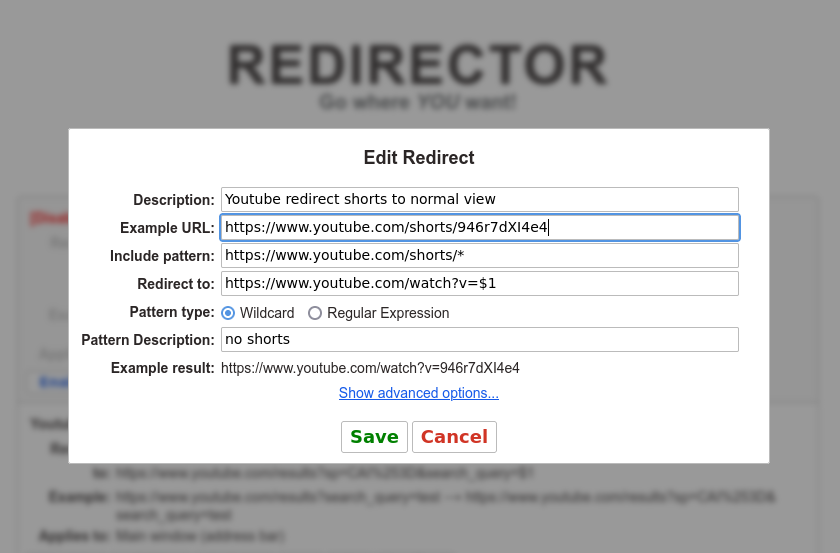
Redirect Youtube Shorts to Normal Viewer

Youtube shorts redirect to normal viewer


Problem: Desktop view of youtube.com shorts uses a new video format which is annoying, automatically loops and harder to comment on.

Solution:
Firefox or Chrome extension prerequisite: “Redirector” by Einar Eglisson. https://einaregilsson.com/redirector/
Note: It may require browser restart to function properly.

Settings:


Description: Youtube redirect shorts to normal view
Example URL: https://www.youtube.com/shorts/946r7dXI4e4
Redirect: https://www.youtube.com/shorts/*
to: https://www.youtube.com/watch?v=$1
pattern: wildcard

See my earlier tip for redirecting youtube searches to sorted results:
https://steronius.blogspot.com/2021/09/youtube-search-sort-newest-first.html


as always, good luck!


Please consider crypto tipping: