Showing posts with label phone. Show all posts

May 13, 2018

SAVE $$$ with TING

icon
OMG! I am saving so much money with TING! My costs are HALF my AT&T bill!!!

TL;DR? $25 credit with my referral: https://z3oifh75bbn.ting.com/

I dropped AT&T wireless (AT&T Mobile) completely and you can too. Drop Verizon, Drop T-Mobile, Drop Sprint, Drop MetroPCS, Drop Boost, Drop Cricket, Drop everyone else.  Nobody is as affordable as Ting.

TING has the simplest mobile billing ever! – You pay $6 per phone flat-rate, and then you pay only for the services you use. You do NOT pay for more than you actually use. Every month is adjusted automatically.

For example, our typical month goes as follows: We have two phones ($6 + $6). We use less than 500 minutes talk time (+ $9); we use less than 1000 text messages (+ $5); we use less than 1GB of data (+ $16). This calculates to $42 dollars plus fees and taxes. Our monthly bill is typically $46.23 which is approximately HALF my previous AT&T bill.

This is my actual bill: Simple as simple could be!


Want to save money also? Please use my referral https://z3oifh75bbn.ting.com – You will receive a $25 credit to apply to a phone or service. You will not be disappointed with Ting!


 ~~~


Want to get a "free" landline?  Visit my old post: http://steronius.blogspot.com/2015/05/practically-free-landline-service-with.html


As always, good luck!!!


Save money
save cash
pay less
save money for phone service
save money for cell phones
save money for mobile phones


Please consider crypto tipping:
  

February 24, 2018

Lost or Stolen Mobile Device Location Services (Find My Device)

Lost or Stolen Mobile Device Location
(Modern Devices 2014 2015 2016 2017 2018)


In the event of lost or stolen devices, it is best to have your device prepared ahead of time.

Below are the "native" ways to do, but I will also present two other free services afterward.  Generally your device has to be powered on and have connectivity.  Some services offer a last seen location.

Android

To prepare your Android device, install "Device Manager" from the Google Play Store. Login with your Google account and approve location sharing if necessary. You may need to turn on Settings->Location Access+GPS+WiFi. If you have multiple Android devices, this app will also help locate your other devices.

In the event of a lost or stolen device, visit https://www.google.com/android/devicemanager and login with your Google account that was used to setup the device. Device Manager allows you to locate, ring, lock or erase your device. (You may have to "Setup Lock & Erase" First.)

iOS

To prepare your iPhone or iPad, go to Settings->iCloud. Login if necessary (use your Apple account) and pan down to "Find my iPhone" (or iPad) and turn it on. Also turn on "Send Last Location". You may need to turn on Settings->Privacy->Location Services also.

In the event of a lost or stolen device, visit https://www.icloud.com/#find to locate your device.

3rd Party

Now although the above certainly work, I personally don't want to be limited to only this.

I also recommend both Prey (https://preyproject.com/) and Lookout (https://www.lookout.com/).

Prey is a free location/anti-theft app for up to three devices including laptop computers. If lost or stolen, visit https://panel.preyproject.com/app where you can locate, lock, erase, send an alert, or sound an alarm. Prey may also be able to access the front facing camera.

Lookout is a free antivirus, backup, and device-location app with additional paid backup features. Once installed and configured, visit https://www.lookout.com/d/missingDevice to locate, lock, erase, or sound an alarm.

Plan B (https://faq.lookout.com/categories/20504137-plan-b) offered by Lookout.com may also help you locate your Android device if you have not configured any previous location services.

Good luck!

Please consider crypto tipping:
  

January 24, 2018

Practically "Free" Landline service with ObiHai and Google voice (VOIP)


FREE LANDLINE PHONE - IT'S TRUE !!!

I have purged myself from paying for a traditional landline.

I can hardly believe that's it's been this long.  Since November of 2013, I have had practically free landline service by using Google Voice via an OBIHAI.com device over my Internet Service.  (Yes, I do pay separately for Internet.)  Google Voice calling is free nation-wide. (If you need to call overseas, they offer extremely low international rates.)

If I had retained my traditional phone service costing about $30 per month, I would have paid over $360+fees+taxes per year. However, I have only paid 80 cents per month for my optional e911 from Anveo.com, plus the initial cost of hardware.

How i did it:

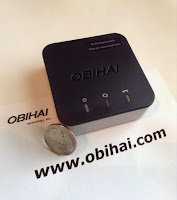
I purchased the OBi200 from Amazon for less than $50.  You may also choose the Obi202, which is 2-port version. You should also purchase the replacement warranty 3rd party service for less than $5.  OBIHai Officially supports Google Voice. Also see the OBIHai+GoogleVoice Overview.


I then acquired a Google Voice phone number and configured my ObiHai to use it.  (Technically, I ported my existing number for a cost, but such is optional.  If you find you cannot port your landline number, you can circumvent the system by porting it to a mobile device SIM, then to Google -- This was a $30 and 5 day process for me -- again this is optional as I preferred to retain my existing number.)

My family has utilized "FREE" VOIP phone service for years now and it is of the same quality as any phone service from a traditional provider.  It works perfectly with my multi-phone cordless base-set much like this one.  Additionally, with Google Voice, I am able to receive voicemail recordings and missed call notifications direct to my Gmail.  I can also block numbers easily via web interface and use other awesome features such as having Calling Circles for filtering calls direct to voicemail.

Most telephony service providers are now only offer VOIP anyway.  With Google and OBiHai you can now remove the middle-man and have the same service without the $20-30 monthly costs associated with it.

Google Voice does NOT provide 911 service; however, Anveo.com provides me with e911 for a mere 80 cents per month.

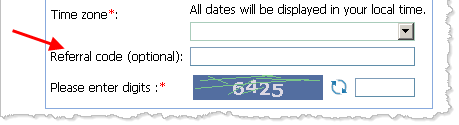
Please consider using my Amazon affiliate Ad for the OBi200 above and optionally my Anveo.com referral code 7384061.

For a little more detail on the ObiHai device, see this nice article: https://www.geekzone.co.nz/sbiddle/8736

DO NOT BUY OBi300 nor OBi302, they DO NOT SUPPORT GOOGLE VOICE!
Buy OBi200 or OBi202, or research other products.
---
As Always, Good Luck!


Please comment or tip me or use any/all of my affiliate links; Thank YOU!
You can thank me with bitcoin.    


free phone
free landline
free voice
free google phone
free google voice
quit ATT
quit AT&T
stop paying